As someone who’s never been a huge fan of React, I found myself diving headfirst into building TimeMomo - a real-time collaborative timer platform. This project was born out of a desire to learn more about modern web development stacks while creating something genuinely useful (for me, if no one else!).
TimeMomo is designed for presenters, streamers, and event managers who need to share timers with audiences in real-time, without the complexity of traditional WebSocket implementations.
What is TimeMomo?
TimeMomo is a collaborative timer application that allows users to create “rooms” where timers can be started, paused, and synchronized across all participants in real-time. Think of it as a professional timer platform for:
- Presenters who need to manage speaking time during conferences
- Streamers who want to share countdowns with their audience
- Event managers coordinating multiple sessions
- Meeting facilitators keeping discussions on track
The app features a clean, intuitive interface with room management, user authentication, and responsive design that works seamlessly on both desktop and mobile devices.
Using TimeMomo is simple.
Register > Create a room > Share the room URL with audience and presenters to see a common timer.
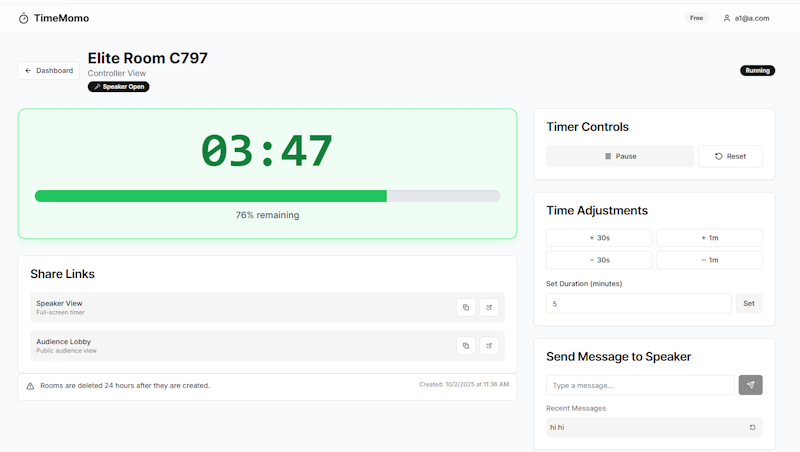
It is an alternative to apps like stagetimer.io, but let’s face it - there are many great apps and it’s not a great alternative. TimeMomo happens to be the app I built.
Use it for free (well, limited to 3 concurrent rooms and ~100 participants). http://timemomo.techformist.com/
Or, make the project your own! TimeMomo is open source and available on GitHub.
Try it out and let me know what you think!
Why I Built This
My motivation was twofold: learning and solving a real problem. Despite my reservations about React (I’ve always preferred Vue/Nuxt), I wanted to challenge myself with Next.js to understand what all the hype was about. At the same time, I kept encountering situations where I needed a reliable timer that could be shared across devices without the hassle of screen sharing or manual coordination.
The idea crystallized when I realized how many professional settings could benefit from a real-time timer platform - from agile ceremonies to public speaking events. And since I’m a big fan of keeping things simple, I wanted to build something that didn’t require complex infrastructure.
Technology Choices: Keeping It Simple and Powerful
Next.js: Facing My React Fears
Choosing Next.js was a deliberate step outside my comfort zone. As someone who’s struggled with React’s verbosity and component lifecycle complexities, I approached this with skepticism. However, Next.js 15’s improvements, combined with TypeScript, made the experience surprisingly smooth. The App Router and server components felt more intuitive than I expected, and the built-in optimization features handled performance concerns automatically.
PocketBase: Real-Time Magic
This is where the project really shines. PocketBase is absolutely incredible for real-time applications. While I always appreciated the one-file philosophy for entire backend, I was blown away by how it handles live synchronization without needing to set up WebSocket servers or manage connection states. The real-time subscriptions API is so clean and reliable that I could focus on building features rather than infrastructure.
The decision to use PocketBase instead of traditional WebSockets was a game-changer. It simplified the architecture dramatically:
- No need for separate WebSocket servers
- Built-in authentication and authorization
- SQLite backend that’s easy to deploy
- Automatic real-time updates across all connected clients
Shadcn/UI: The UI I Always Wanted
If PocketBase is the backend hero, Shadcn is definitely the frontend star. The developer experience is exceptional - copy-paste components that just work, with full TypeScript support and excellent documentation.
Dokploy: Deployment Adventures
Using Dokploy for the first time was an interesting experience. I always wanted the Vercel / Netlify experience at budget and this is certainly it. The ability to deploy both the Next.js frontend and PocketBase backend as containers with automated CI/CD made the whole process much smoother than traditional hosting setups.
Travails and Turbulences: The Learning Curve
Building TimeMomo wasn’t without its challenges. As someone new to React/Next.js, I hit several roadblocks:
React Learning Pains
- Understanding React’s component lifecycle and hooks took time
- State management across real-time updates required careful planning
- TypeScript integration had a learning curve, especially with complex types
I am still not a fan.
Real-Time Synchronization Headaches
- Love the real-time capabilities
- Debugging hooks - not so much
Deployment Drama
- Dokploy’s initial setup was trickier than expected
- Docker networking between Next.js and PocketBase containers
And finally.. addressing the AI in the room
AI tools were incredibly helpful throughout this project. I started out with Bolt, and switched to VSCode. Throughout the cycle, AI assistance was a game-changer for Next.js and Shadcn specifically. I was never very successful getting clean first versions out with Nuxt in the past, but with React I could certainly iterate much faster.
- Fast conversion of design ideas into working React components
- Query issues during development
- Get contextual answers for deployment issues
In Conclusion
This project taught me that sometimes stepping outside your comfort zone pays off. While I’m still not a React convert, I now understand its strengths and can appreciate why it’s so popular. The combination of Next.js + PocketBase + Shadcn proved to be incredibly productive.
Looking ahead, I’m excited about the potential improvements:
- Nuxt 4 with Nuxt UI and Shadcn-Vue MCP (that AI-assisted Vue development I keep hearing about)
- Laravel with Laravel Boost!
My plans for this app? Well, not much - unless I see people really interested.